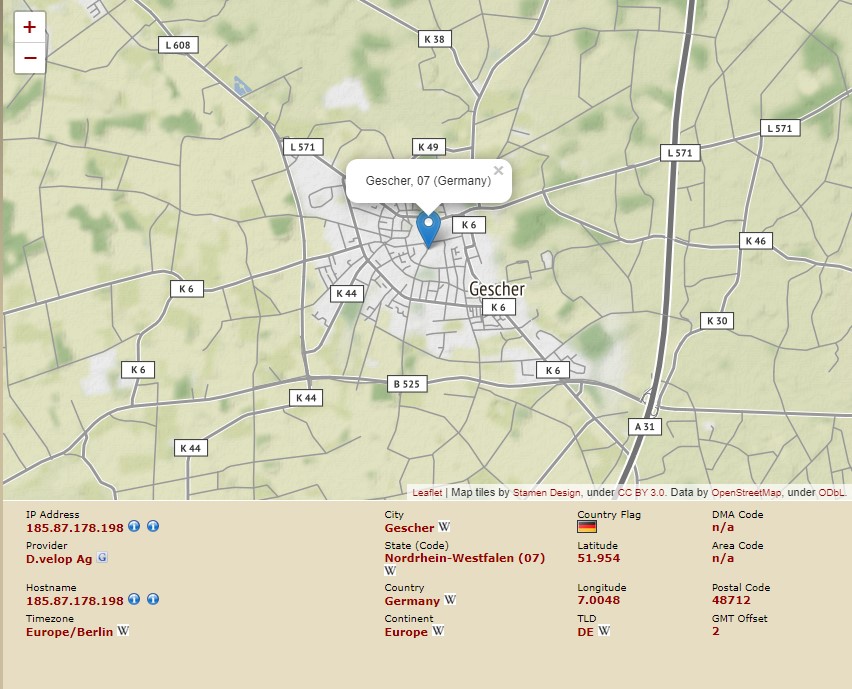
Over time we have borne witness as malware writers become craftier and embed code which allows them to determine virtualization. The reason for this is that most analyst who attempt to reverse engineer or analyze malware will do so on a virtual machine. Hence it would only make sense that the malware author would implement some level of countermeasure. Some of the ways this is achieved are as follows:
- checking the system’s processor ID
- the Win32_Computer entry in WMI, it looks here to see if the words VIRTUAL, VMWARE, or VIRTUALBOX are to be found
- a WMI request to the BIOS. If a response is received that contains the word: ‘VMware,’ ‘Virtual,’ ‘XEN,’ ‘Xen’ the system is considered as a virtual machine. Serial number and BIOS versions are also checked.
- the machine’s MAC Address to determine if it starts by a well-known hexadecimal number.
- Application count function – this queries the operating system for the presence of running processes on the graphical interface. If whatever script is running finds less than its threshold then it presumes the box to be a testing workstation.
- Macro scripts that determine a list of recently opened files. If the scripts somewhere about two or more files recently opened then it will presume the workstation to be normal.
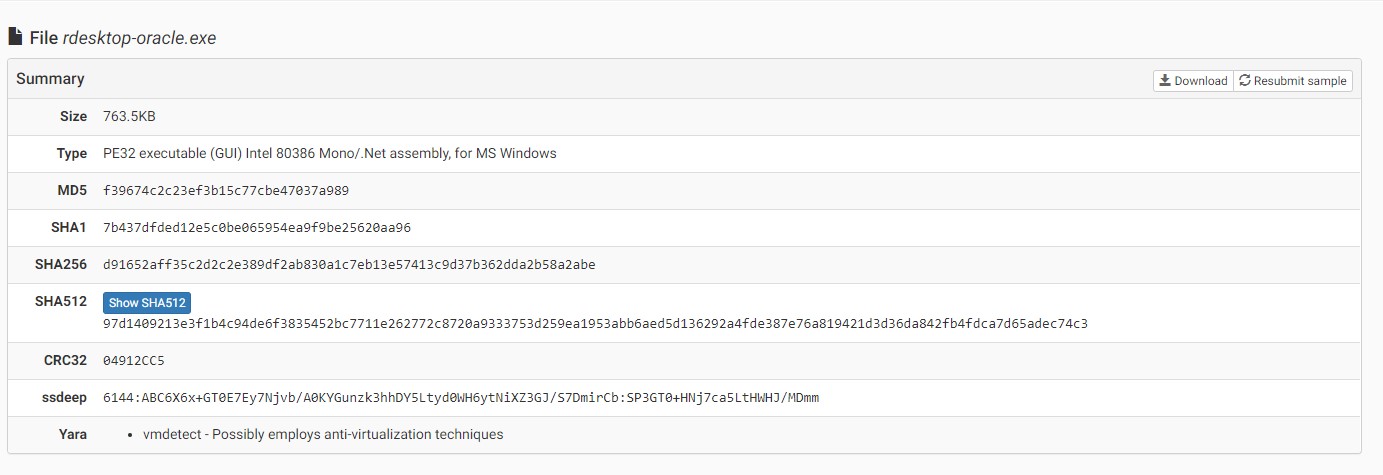
At the time that I tested the malware in our lab there which was on October 16th VirusTotal had a detection rate of 21 out of 70. Currently its 42 out of 70. Once again this demonstrates the need to be proactive. If you wait for signatures to be developed and updated your data will be gone or worse, a persistent infection until someone decides to run virus updates. This simply will not do.
Section One:
Live Analysis –
Usually we analyze first via the sandbox and then in a live environment. For the purposes of this presentation we shall go with the live analysis. As you can see in the above, this malware has anti-vm countermeasure built in.
Part One:
The first appearance in the logs is Event ID 4656. Here we have PickerHost.exe which is the Windows file selector. This is not our Patient Zero. All we have here is the first sign of the malware in the logs, but it has not done anything yet.
A handle to an object was requested.
Subject:
Security ID: S-1-5-21-372134654-1229274158-1178834050-500
Account Name: Administrator
Account Domain: PROJECTFARSCAPE
Logon ID: 0xE769DC1
Object:
Object Server: Security
Object Type: File
Object Name: C:\Users\Administrator\Documents\rdesktop-oracle.exe
Handle ID: 0xaf4
Resource Attributes: -
Process Information:
Process ID: 0x1cd8
Process Name: C:\Windows\System32\PickerHost.exe
Access Request Information:
Transaction ID: {00000000-0000-0000-0000-000000000000}
Accesses: READ_CONTROL
SYNCHRONIZE
ReadData (or ListDirectory)
WriteData (or AddFile)
AppendData (or AddSubdirectory or CreatePipeInstance)
ReadEA
WriteEA
ReadAttributes
WriteAttributes
Access Reasons: -
Access Mask: 0x12019F
Privileges Used for Access Check: -
Restricted SID Count: 0
Part Two:
Here we see our patient zero. The parent image is explorer.exe. It loads the rdesktop-oracle.exe executable. The OriginalFileName field does not coincide with the name of the image being loaded. This is an alert we look for and most certainly means something is not right.
Process Create:
RuleName:
UtcTime: 2019-10-17 18:27:09.185
ProcessGuid: {a4a0271f-b27d-5da8-0000-00103f4f9c0e}
ProcessId: 7516
Image: C:\Users\Administrator\Documents\rdesktop-oracle.exe
FileVersion: 9.14.19.24
Description: ;H>J;8BIA<:7G=;8J;A>GLN
Product: ;H>J;8BIA<:7G=;8J;A>GLN
Company: :OF>PJ?DA:DNNNG@K
OriginalFileName: P.0 872_1TA004.exe
CommandLine: "C:\Users\Administrator\Documents\rdesktop-oracle.exe"
CurrentDirectory: C:\Users\Administrator\Documents\
User: PROJECTFARSCAPE\Administrator
LogonGuid: {a4a0271f-b052-5da8-0000-0020c19d760e}
LogonId: 0xE769DC1
TerminalSessionId: 1
IntegrityLevel: High
Hashes: SHA1=7B437DFDED12E5C0BE065954EA9F9BE25620AA96
ParentProcessGuid: {a4a0271f-b055-5da8-0000-0010505f770e}
ParentProcessId: 3768
ParentImage: C:\Windows\explorer.exe
ParentCommandLine: C:\WINDOWS\Explorer.EXE /NOUACCHECK
There is also the issue with the parent command line. A no UAC check means command elevation. These two things are items we must look for. Neither should be the case on an end user’s workstation unless the administrator is installing software and as the end-user is not the administrator this should be monitored. Note also here that the description, product, and company field have odd characters.
Part Three:
The second event that is of grave consequence is a new process being spawned from the parent.
Here we see a command shell that is created. We look for these events by having our system alert us to any image with a cmd.exe in its path.
Process Create:
RuleName:
UtcTime: 2019-10-17 18:27:10.428
ProcessGuid: {a4a0271f-b27e-5da8-0000-0010e5799c0e}
ProcessId: 9488
Image: C:\Windows\SysWOW64\cmd.exe
FileVersion: 10.0.18362.1 (WinBuild.160101.0800)
Description: Windows Command Processor
Product: Microsoft® Windows® Operating System
Company: Microsoft Corporation
OriginalFileName: Cmd.Exe
CommandLine: "C:\Windows\System32\cmd.exe" /C type nul > "C:\Users\Administrator\Documents\rdesktop-oracle.exe:Zone.Identifier"
CurrentDirectory: C:\Users\Administrator\Documents\
User: PROJECTFARSCAPE\Administrator
LogonGuid: {a4a0271f-b052-5da8-0000-0020c19d760e}
LogonId: 0xE769DC1
TerminalSessionId: 1
IntegrityLevel: High
Hashes: SHA1=C896CC027A644F7ABB6D8DD968A681F345F55D90
ParentProcessGuid: {a4a0271f-b27d-5da8-0000-00103f4f9c0e}
ParentProcessId: 7516
ParentImage: C:\Users\Administrator\Documents\rdesktop-oracle.exe
ParentCommandLine: "C:\Users\Administrator\Documents\rdesktop-oracle.exe"
Within the command line there is a flag after the file suffix called Zone.Identifier. Patient Zero was the image name differing from the OriginalFileName as well as the NOUACCHECK. This is further evidence that the executable is diseased. It has spawned a command shell and runs the malware with a suffix that looks for the storage of url security zones.
Part Four:
The malware then does something interesting which gives us a clue of how its written and possibly how it shall act upon the operating system.
Process Create:
RuleName:
UtcTime: 2019-10-17 18:28:00.955
ProcessGuid: {a4a0271f-b2b0-5da8-0000-0010f68a9f0e}
ProcessId: 8236
Image: C:\Windows\Microsoft.NET\Framework\v4.0.30319\RegAsm.exe
FileVersion: 4.8.3752.0 built by: NET48REL1
Description: Microsoft .NET Assembly Registration Utility
Product: Microsoft® .NET Framework
Company: Microsoft Corporation
OriginalFileName: RegAsm.exe
CommandLine: "C:\Windows\Microsoft.NET\Framework\v4.0.30319\RegAsm.exe"
CurrentDirectory: C:\Users\Administrator\Documents\
User: PROJECTFARSCAPE\Administrator
LogonGuid: {a4a0271f-b052-5da8-0000-0020c19d760e}
LogonId: 0xE769DC1
TerminalSessionId: 1
IntegrityLevel: High
Hashes: SHA1=9E03F443962FDF5C5A5C9A8A2C6847169461F20B
ParentProcessGuid: {a4a0271f-b27d-5da8-0000-00103f4f9c0e}
ParentProcessId: 7516
ParentImage: C:\Users\Administrator\Documents\rdesktop-oracle.exe
ParentCommandLine: "C:\Users\Administrator\Documents\rdesktop-oracle.exe"
In this event we see the malware which is the Parent create a new process. This process is RegAsm.exe which is in the .NET Framework directory. This is the Assembly Registration Tool, it reads metadata within an assembly and adds entries to the to the registry, this allows COM clients to create .NET Framework classes transparently. This obviously means that malware has its roots in the .NET platform. Injecting itself via this method into the operating system is effective and damning.
Part Five:
The next event that stands out for several reasons.
- The process initiating the windows filtering platform is within the .NET framework directory
- An outbound network connection has been allowed
- The connection is over port 80
The Windows Filtering Platform has permitted a connection.
Application Information:
Process ID: 8236
Application Name: \device\harddiskvolume2\windows\microsoft.net\framework\v4.0.30319\regasm.exe
Network Information:
Direction: Outbound
Source Address: 192.168.40.40
Source Port: 49556
Destination Address: 185.87.187.198
Destination Port: 80
Protocol: 6
Filter Information:
Filter Run-Time ID: 68226
Layer Name: Connect
Layer Run-Time ID: 48
Note:
There is a lot going on here as you can imagine. To put some context on how the Assembly Registration Tool can be dangerous if used in a foul manner, we see several events in the logs like the below
A handle to an object was requested.
Subject:
Security ID: S-1-5-21-372134654-1229274158-1178834050-500
Account Name: Administrator
Account Domain: PROJECTFARSCAPE
Logon ID: 0xE769DC1
Object:
Object Server: Security
Object Type: File
Object Name: C:\Users\Administrator\AppData\Roaming\95737D\D5BF4C.lck
Handle ID: 0x374
Resource Attributes: -
Process Information:
Process ID: 0x202c
Process Name: C:\Windows\Microsoft.NET\Framework\v4.0.30319\RegAsm.exe
Access Request Information:
Transaction ID: {00000000-0000-0000-0000-000000000000}
Accesses: READ_CONTROL
SYNCHRONIZE
ReadData (or ListDirectory)
WriteData (or AddFile)
AppendData (or AddSubdirectory or CreatePipeInstance)
ReadEA
WriteEA
ReadAttributes
WriteAttributes
Access Reasons: -
Access Mask: 0x12019F
Privileges Used for Access Check: -
Restricted SID Count: 0
The file in the user’s directory is a lck file. This is an access control file used to lock a database or other file from being opened or changed by more than one user at a time. This is one of the methods of how the malware establishes its control over the system.
Part Six:
Data theft
The malware is now requesting access to an object. That object is the Credentials directory found in the user’s directory. It is evident that it is going to read what is in there.
A handle to an object was requested.
Subject:
Security ID: S-1-5-21-372134654-1229274158-1178834050-500
Account Name: Administrator
Account Domain: PROJECTFARSCAPE
Logon ID: 0xE769DC1
Object:
Object Server: Security
Object Type: File
Object Name: C:\Users\Administrator\AppData\Local\Microsoft\Credentials\DFBE70A7E5CC19A398EBF1B96859CE5D
Handle ID: 0x374
Resource Attributes: -
Process Information:
Process ID: 0x202c
Process Name: C:\Windows\Microsoft.NET\Framework\v4.0.30319\RegAsm.exe
Access Request Information:
Transaction ID: {00000000-0000-0000-0000-000000000000}
Accesses: READ_CONTROL
SYNCHRONIZE
ReadData (or ListDirectory)
ReadEA
ReadAttributes
Access Reasons: READ_CONTROL: Granted by Ownership
SYNCHRONIZE: Granted by D:(A;;FA;;;BA)
ReadData (or ListDirectory): Granted by D:(A;;FA;;;BA)
ReadEA: Granted by D:(A;;FA;;;BA)
ReadAttributes: Granted by D:(A;;FA;;;BA)
Access Mask: 0x120089
Privileges Used for Access Check: -
Restricted SID Count: 0
Part Seven:
RSA Crypto directory being accessed by the malware.
File handles are important, though they tend to be confusing at times, but they give us a path of what is going on via what a process is doing. Here we see the malware accessing the RSA Crypto directory in the user’s profile. This directory is being accessed after the connection to the ip address that we mentioned in Part Five was made. The directory increases in content for every connection. Certificate request are created in this location. No process should be doing this unless you know about it.
(A)
An attempt was made to access an object.
Subject:
Security ID: S-1-5-21-372134654-1229274158-1178834050-500
Account Name: Administrator
Account Domain: PROJECTFARSCAPE
Logon ID: 0xE769DC1
Object:
Object Server: Security
Object Type: File
Object Name: C:\Users\Administrator\AppData\Roaming\Microsoft\Crypto\RSA\S-1-5-21-372134654-1229274158-1178834050-500\a18ca4003deb042bbee7a40f15e1970b_a4a0271f-6bd9-439c-ad6a-44e9da4901bd
Handle ID: 0x35c
Resource Attributes:
Process Information:
Process ID: 0x202c
Process Name: C:\Windows\Microsoft.NET\Framework\v4.0.30319\RegAsm.exe
Access Request Information:
Accesses: WriteData (or AddFile)
AppendData (or AddSubdirectory or CreatePipeInstance)
Access Mask: 0x6
(B)
The malware is writing to the RSA directory. This is one of may writes that is done by the malware to this directory.
An attempt was made to access an object.
Subject:
Security ID: S-1-5-21-372134654-1229274158-1178834050-500
Account Name: Administrator
Account Domain: PROJECTFARSCAPE
Logon ID: 0xE769DC1
Object:
Object Server: Security
Object Type: File
Object Name: C:\Users\Administrator\AppData\Roaming\Microsoft\Crypto\RSA\S-1-5-21-372134654-1229274158-1178834050-500\a18ca4003deb042bbee7a40f15e1970b_a4a0271f-6bd9-439c-ad6a-44e9da4901bd
Handle ID: 0x37c
Resource Attributes:
Process Information:
Process ID: 0x202c
Process Name: C:\Windows\Microsoft.NET\Framework\v4.0.30319\RegAsm.exe
Access Request Information:
Accesses: WriteData (or AddFile)
AppendData (or AddSubdirectory or CreatePipeInstance)
Access Mask: 0x6
Part Eight:
The user is analyzed
In this event we see Event ID 4798 – A user’s local group membership was enumerated.
We look for this event, why – simply put – the malware is accessing the Administrator account of the domain. To clarify – RegAsm uses the domain account as noted in the subject line. Notice the user is Administrator for the local machine. Complacent folk will say, well this could be a false positive. Anytime a process enumerates local group membership you as the operator need to know. This event is critical in catching those who scope out local accounts on systems and it indicates a compromised machine.
A user's local group membership was enumerated.
Subject:
Security ID: S-1-5-21-372134654-1229274158-1178834050-500
Account Name: Administrator
Account Domain: PROJECTFARSCAPE
Logon ID: 0xE769DC1
User:
Security ID: S-1-5-21-1100231172-1986677086-319568495-500
Account Name: Administrator
Account Domain: ABERRATION
Process Information:
Process ID: 0x202c
Process Name: C:\Windows\Microsoft.NET\Framework\v4.0.30319\RegAsm.exe
Part Nine:
Hide thy sins
Alerts for Event ID 4660 are invaluable. Any process that deletes something must be monitored as no process should have this permission unless you know about it.
An object was deleted.
Subject:
Security ID: S-1-5-21-372134654-1229274158-1178834050-500
Account Name: Administrator
Account Domain: PROJECTFARSCAPE
Logon ID: 0xE769DC1
Object:
Object Server: Security
Handle ID: 0x384
Process Information:
Process ID: 0x202c
Process Name: C:\Windows\Microsoft.NET\Framework\v4.0.30319\RegAsm.exe
Transaction ID: {00000000-0000-0000-0000-000000000000}
Part Ten:
Network detection resolved
We resolve dns names in our logs. We are able then to see a name to where the malware is making contact.
Network connection detected:
RuleName:
UtcTime: 2019-10-17 18:28:18.306
ProcessGuid: {a4a0271f-b2b0-5da8-0000-0010f68a9f0e}
ProcessId: 8236
Image: C:\Windows\Microsoft.NET\Framework\v4.0.30319\RegAsm.exe
User: PROJECTFARSCAPE\Administrator
Protocol: tcp
Initiated: true
SourceIsIpv6: false
SourceIp: 192.168.40.40
SourceHostname: aberration.projectfarscape.net
SourcePort: 49556
SourcePortName:
DestinationIsIpv6: false
DestinationIp: 185.87.187.198
DestinationHostname: registrar-eu-pr001.openprovider.nl
DestinationPort: 80
DestinationPortName: http
Part Eleven:
I leave a piece of me for you
The windows prefetch folder is a specific location that contains a series of files detailing the startup activities and frequently used application programs. Each time the computer starts, the prefetcher portion of the memory manager in Windows references the prefetch folder to learn about previous startup activities and the applications that were used. This allows for accelerated startups. With that being said observe the below event – Event ID 4656 courtesy of svchost.exe a windows process.
A handle to an object was requested.
Subject:
Security ID: S-1-5-18
Account Name: ABERRATION$
Account Domain: PROJECTFARSCAPE
Logon ID: 0x3E7
Object:
Object Server: Security
Object Type: File
Object Name: C:\Windows\Prefetch\REGASM.EXE-4EFC4B44.pf
Handle ID: 0x254
Resource Attributes: -
Process Information:
Process ID: 0x8d4
Process Name: C:\Windows\System32\svchost.exe
Access Request Information:
Transaction ID: {00000000-0000-0000-0000-000000000000}
Accesses: READ_CONTROL
SYNCHRONIZE
ReadData (or ListDirectory)
WriteData (or AddFile)
AppendData (or AddSubdirectory or CreatePipeInstance)
ReadEA
WriteEA
ReadAttributes
WriteAttributes
Access Reasons: -
Access Mask: 0x12019F
Privileges Used for Access Check: -
Restricted SID Count: 0
Conclusion:
Not all malware is created equally. In this little presentation of ours we touched on the damaging aspects of a Trojan which is built around the .NET framework and what it can do. As mentioned earlier, at the time of analysis the VirusTotal detection was relatively low. You cannot depend on signatures and the larger corporations to keep you safe. A degree of understanding, vigilance, and creative thinking are the order of the day. If something does not look right, chances are you should check it out. I stress also that this scrapes the surface of what this Trojan was doing. We alert for the most damning events but there is so much going on. There is no one panacea, only a recipe that will keep you safe and healthy.
Figure One:
Process Tree

Figure Two:
VirusTotal detection
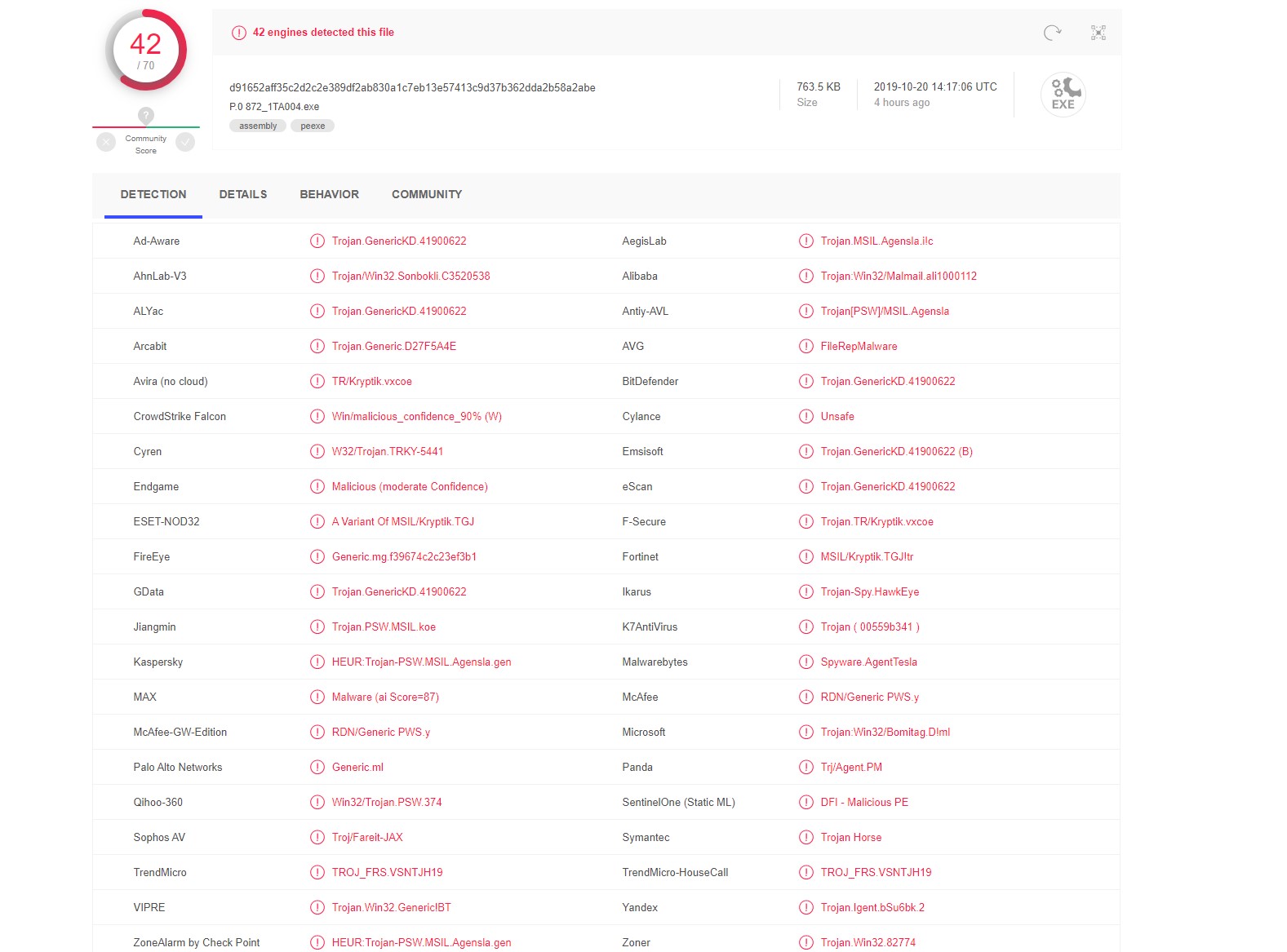
Figure Three:
Location of ip address where network connect occurs –